




Background
HL7 v2 remains a foundational component of healthcare systems, enabling communication between devices, applications, and clinical workflows. However, its design reflects an earlier era of system architecture, where interoperability was prioritised over security and standardisation.
For those responsible for maintaining and securing these integrations, understanding how HL7 v2 messages are structured and transmitted is key to identifying where issues can arise in practice.
It is one of the most common medical standards in the world, used in over 35 countries and 95% of healthcare organisations in the US. The widespread nature of this standard coupled with the lack of security features, such as encryption and authentication as discussed later in this article, means that any healthcare facility with such implementations needs to understand the risks associated with this standard to ensure appropriate and necessary protections are in place.
It is essential that the security of this, and other medical specific standards and protocols, is not overlooked. Doing so could incur significant regulatory fines, damage organisational reputation, but above all would risk the safety and privacy of patients.
Message Format
HL7 v2 messages have a recognisable format, they contain several text fields separated by pipe delimiters and always start (except for batch messages) with an “MSH” message header. An HL7 v2 message might look something like this:
MSH|^~\&|HIMS01|CALADAN HOSPITAL|LAB01|CALADAN HOSPITAL|20231115123246||ADT^A01^ADT_A01|934576120110613083617|P|2.8|||| EVN|A01|20110613083617||| PID|1||135769||ATRIEDES^LETO^I^||19870628|M|||House of Atriedes^Castle^Caladan^Caladan^Dune||(0)161-123-4567^^^leto.I@atriedes.caladan|||||1719|||||Caladan|||||||||||||||| NK1|1|JESSICA^LADY|WIFE|||||| PV1|1|O|||||^^^^^^^^|^^^^^^^^Let’s break this down. A message contains segments, these are each line of a message. Using the above example each segment is separated out below:
MSH|^~\&|HIMS01|CALADAN HOSPITAL|LAB01|CALADAN HOSPITAL|20231115123246||ADT^A01^ADT_A01|934576120110613083617|P|2.8||||EVN|A01|20110613083617|||PID|1||135769||ATRIEDES^LETO^I^||19870628|M|||House of Atriedes^Castle^Caladan^Caladan^Dune||(0)161-123-4567^^^leto.I@atriedes.caladan|||||1719|||||Caladan||||||||||||||||NK1|1|JESSICA^LADY|WIFE||||||PV1|1|O|||||^^^^^^^^|^^^^^^^^Segments start with an identifier and end with a carriage return and consist of composites or fields separated by the “field separator” (“|”). The identifier is the first three characters of the segment, and they are, as the name suggests, used to identify the data expected in the segment. So, in the example we’re using the identifiers are:
- MSH – Message Header
- EVN – Event Type
- PID – Patient Identification
- NK1 – Next of Kin
- PV1 – Patient Visit
Segment presence and order depend on the message type, this concept is discussed later.
Next if we look at the MSH segment we can divide it up by the fields/composites, these are shown below and include the content, if present, from the example message:
| MSH | ^~\& | HIMS01 | CALADAN HOSPITAL | LAB01 | CALADAN HOSPITAL | 20231115123246 | ADT^A01^ADT_A01 | 934576120110613083617 | P | 2.8 |
- Message Header –
MSH - Encoding Characters –
^~\& - Sending Application –
HIMS01 - Sending Facility –
CALADAN HOSPITAL - Receiving Application –
LAB01 - Receiving Facility –
CALADAN HOSPITAL - Date/Time of message –
20231115123246 - Security (ST) – Not Present
- Message Type (MSG) –
ADT^A01^ADT_A01 - Message Control ID (ST) –
934576120110613083617 - Processing ID (PT) –
P - Version ID (VID) –
2.8 - Sequence Number (NM) –
Not Present - Continuation Pointer (ST) –
Not Present - Accept Acknowledgement Type (ID) –
Not Present
The composites, or fields, are the bits in between the pipe (“|”) delimiters, these are further divided into subfields separated by the carat (“^”) symbol and further subdivided using the ampersand (“&”) symbol. The content of the fields is determined by the identifier. For example, a segment with the PID identifier will contain patient details such as name, hospital ID, date of birth. A patient allergy identifier (AL1) will contain information on what the patient is allergic to and any adverse reactions.
The MSH header segment contains 15 fields in total, 7 of these are mandatory and they are (with the corresponding extract from the example above):
- The field separator – “
|” - Encoding characters – “
^~\&”- ^ component separator
- ~ repetition separator
- \ escape character
- & subcomponent separator
- Date/time of message – “
20231115123246” (YYYYMMDDHHMMSS) - Message type – “
ADT^A01^ADT_A01”- This includes a message code ID (ADT), trigger event ID (A01) and message structure (ADT_A01), which are codes that indicate what the message is for and the message syntax.
- Message control ID – “
934576120110613083617”- A unique message ID, the receiver should reply with the same message ID from the sender.
- Processing ID – “
P”- Informs what type of system this is for (production, training, debugging) to facilitate message priorities.
- Version ID – “
2.8”
Message Types
There are many message types in HL7 v2, the message type is the 9th field in an HL7 message. Message types consist of a type and a trigger separated by the component separator symbol. Using the MSH segment from our example message, the message type field is shown below in the middle of the second line in white, sandwiched between two lavender values:
MSH|^~\&|HIMS01|CALADAN HOSPITAL|LAB01|CALADAN HOSPITAL|20231115123246||ADT^A01^ADT_A01|934576120110613083617|P|2.8||||The above message type is an Admit Discharge Transfer message (ADT) and an associated “admit notification” trigger event as denoted by the “A01”. The message type can also be formatted like “ADT^A01”, this is a legacy format that does not include the message structure component that was introduced in version 2.3.1.
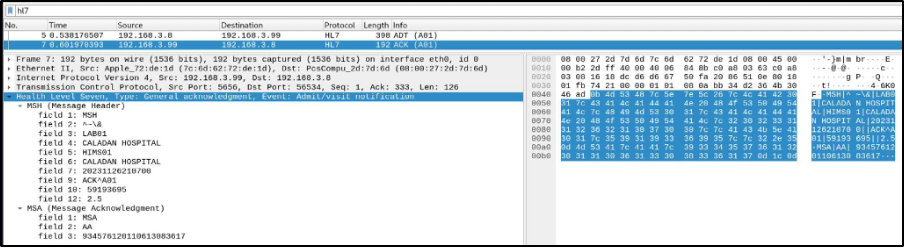
All messages should be followed up by an HL7 v2 acknowledgement (ACK) message. This consists of an MSH segment and an MSA (acknowledgement) segment. Something like the following:
MSH|^~\&|LAB01|CALADAN HOSPITAL|HIMS01|CALADAN HOSPITAL|20231124201917||ACK^A01|35175470||2.5 MSA|AA|934576120110613083617The above MSA segment has the identifier, the acknowledgement code (“AA” – this can also be an error “AE” or reject “AR” code), and the message control ID. The message control ID should match the ID from the message the response is associated with.
If no ACK is received then, depending on the configuration, the client may either retry a set number of times or pause sending in the case of messages that are sent in a sequence. Both cases allow for abuse as discussed later.
Technical
HL7 v2 uses the Minimum Lower Layer Protocol (MLLP) to send messages over the network. MLLP transmits over TCP, it wraps the HL7 v2 data to create a “block” that is formed using a start byte (0x0b), the HL7 v2 data, an end byte (0x1c) and a carriage return (0x0d):
| Start Byte (0x0b) | HL7 v2 Data | End Byte (0x1c) | Carriage Return (0x0d) |
The packet capture below shows an HL7 v2 message with the start, end and carriage return bytes highlighted in red:
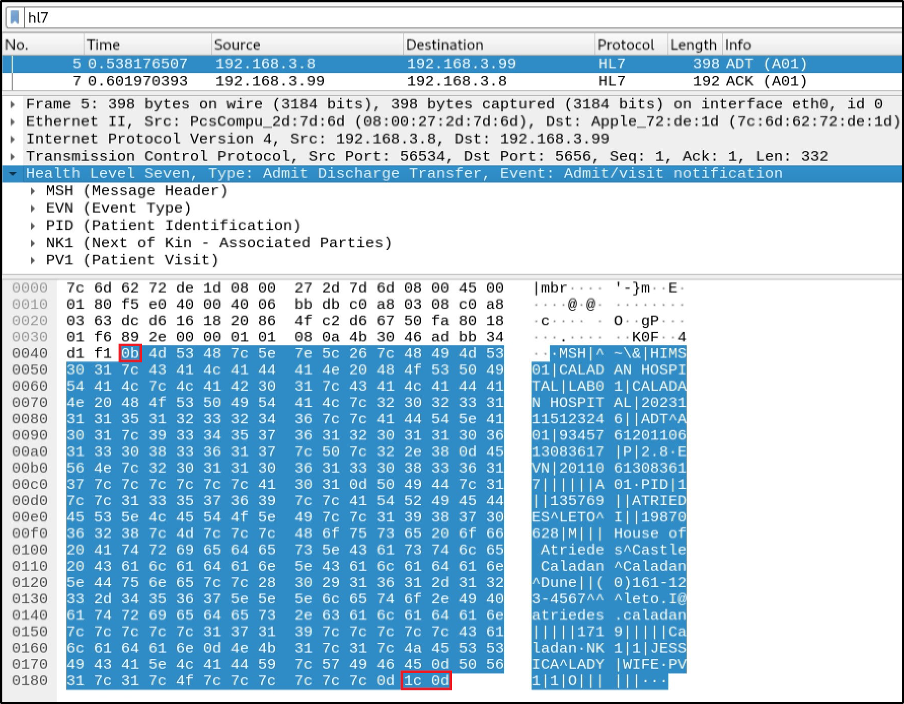
Due to its simplicity, it can be easy to integrate, but this also means it can be easily abused by attackers.
HL7 v2 Packet Capture
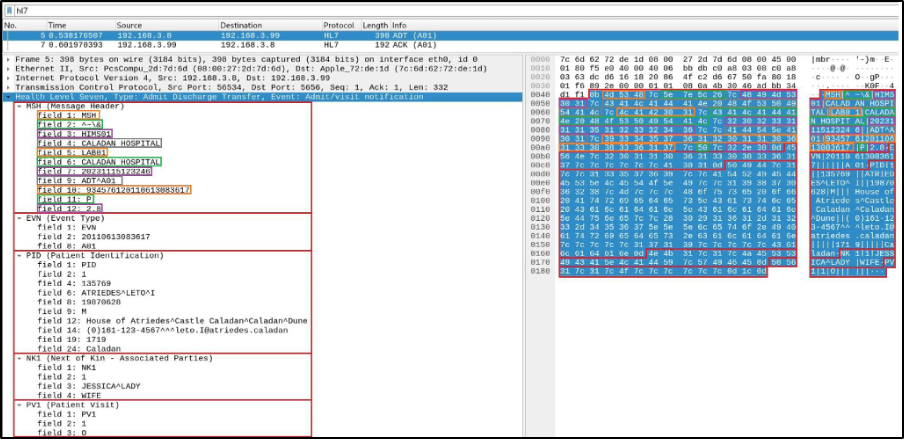
HL7 v2 has a standard port (2575) assigned by IANA but it isn’t always used, this can make it a bit tricky to immediately identify HL7 v2 services on a host. One way to identify them would be through sniffing the network traffic. Conveniently, as shown above, Wireshark has a HL7 filter. A different view of the previous packet capture shows the message separated out into segments; these have been expanded out to show the fields in each segment. The segments have been highlighted in red, and each field of the first segment (MSH) has been highlighted in alternating orange, green, purple, and grey:
And the corresponding ACK:
When sniffing network traffic, Wireshark may not identify HL7 v2 if another protocol is assigned to the port the traffic is being sent or received on. You may need to check this in “View > Internals > Dissector > Dissector Tables”.
HL7 v2 Messaging Tools
There are some HL7 tools available for free or for a time limited period depending on the vendor. Alternatively, if you don’t want to use these there are various python modules that can be used to code a quick script. You could use the following code to send an HL7 v2 message and receive the corresponding ACK, you’ll need to install Python packages hl7apy and hl7 for it to run:
import socket import hl7 from hl7apy.core import Message from hl7apy.parser import parse_message
msh = "<HL7_message_to_send>" hl7_out = parse_message(msh).to_mllp() s = socket.socket(socket.AF_INET, socket.SOCK_STREAM) s.connect(("<ip_address>", <port>)) s.sendall(hl7_out.encode()) h = hl7.parse(s.recv(1024)) s.close() print("Reply from device:") for i in h: print(i)Security Issues
Authentication and Authorization
A couple of key points about the standard is that there is no authentication requirement or verification of the message source. Once an HL7 v2 interface has been identified it is unlikely you’ll need to authenticate to start interacting with it. Depending on what types of messages the interface is configured to receive you could add, alter or extract patient data from anywhere with network access. For example, if an interface accepts ADT messages, an attacker could send multiple update (A08) or discharge (A03) messages with false information that could cause data corruption in downstream systems.
Message Replay and Injection
Another potential issue is when an interface/integration engine is in use. Interface engines facilitate communication between different devices and systems that wouldn’t be able to otherwise. They are highly flexible and configurable, but this also means they have the potential to impose a significant effect on patient data. For example, if HL7 v2 data from a device or system is converted and inserted directly into the database for an EHR (Electronic Health Record). An attacker could conduct injection attacks by inserting malicious SQL commands into legitimate HL7 v2 messages that are parsed by the interface engine and subsequently passed to and processed by the database server.
One targeted attack would be to intercept HL7 messages and alter allergy fields, ADT A60 message type and trigger event is used to update an allergy. This was demonstrated by Christian Dameff, Maxwell Bland, Kirill Levchenko and Jeff Tully using their tool Pestilence.
Encryption
Perhaps the most concerning point is that the standard does not mandate encryption, meaning it is often transmitted over the network in cleartext. From the HL7 confluence pages:
“Protection of Healthcare Information HL7 Version 2.9 is largely silent about the issues of privacy authentication and confidentiality of data that pass through HL7 messages. HL7 makes no assumption about the ultimate use of data but rather assumes that both source and destination applications provide for these requirements. In addition, HL7 does not, at this time, specify what, if any, encryption method should be used when transporting HL7-based messages between two or more systems. At this time, HL7 implementers should familiarize themselves with legal and professional requirements for these topics specific to their country’s national or local requirements.”
This is a key issue that will allow a suitably placed attacker on the network to intercept HL7 v2 traffic and extract or alter patient data by merely being in the right place without any need for sophisticated attack methods or exploits.
Data Extraction
The following are examples of message types that can contain sensitive information:
- ADT – Admit Discharge Transfer
- ORM – Order message
- ORU – Observation Result
- RDE – Pharmacy order
ORM and ORU messages can contain OBX (observation) segments, which includes clinical observations and/or results. These can also contain base64 encoded files, usually PDF’s or similar file types that will likely contain sensitive data.
HL7 v2 messages can contain a lot of PII, including PHI (Protected Health Information) for US patient data. Using the first example HL7 v2 message from earlier we can see the PID (Patient Identification) segment includes the patient ID, full name, date of birth, address, phone number, and email address.
PID|1||135769||ATRIEDES^LETO^I^||19870628|M|||House of Atriedes^Castle^Caladan^Caladan^Dune||(0)161-123-4567^^^leto.I@atriedes.caladan|||||1719|||||Caladan||||||||||||||||Conclusion
Due to the nature of the standard and the variance in implementation, securing the interfaces themselves can be challenging. As such the following should be considered and implemented where possible.
If a device or system does not have the capability to encrypt traffic and the device is not easily replaced then network segregation is essential. Devices should be added to a dedicated VLAN with strict access controls over ingress and egress traffic.
Network devices such as switches and routers are sometimes overlooked when securing an environment, but can become more desirable as targets for attackers if the goal is data extraction and patient data is passing through them unencrypted. Packet captures can be conducted from these devices as well as configuring mirror ports to send all data traversing the device to an unauthorized host. Ensuring switches and routers are part of patch management regimes, as well as adhering to strict access control policies to the devices themselves will help mitigate this risk.
Having said that, data in transit must be encrypted as early as possible. If this is not possible on the interface itself then this can be achieved using middleware, such as an interface engine. Traffic from the device to the interface engine will still be unencrypted in this scenario so network segregation is still key.
If HL7 v2 messages are logged or stored in file shares, ensure those shares have the appropriate permissions, following the rules of least privilege, the data is encrypted at rest and is retained only for as long as is necessary for compliance and regulatory purposes. Finding an open share and searching for the MSH header and/or escape characters in folders to find sensitive data has been and will likely continue to be successful.
Whilst attacks against or utilising HL7 v2 are largely reserved to the realm of research, the inherent lack of security will continue to make it a weak link in relation to patient safety and regulatory compliance.
About the Author
Based in the North of England, Stuart Kurutac is a penetration tester with the Novacoast Attack Team (NCAT), specializing in research on healthcare system cybersecurity and protocols. He is a published author in the space, as well as a noted speaker.
References
For further reading on message types the following resources are helpful:
- https://www.hl7.org/documentcenter/public/wg/conf/HL7MSH.htm
- https://corepointhealth.com/resource-center/hl7-resources/hl7-messages
- https://datica.com/academy
Some excellent security research on HL7:
- https://linuxincluded.com/hl7-medical-attacking-defending/
- https://www.youtube.com/watch?v=lY7CRNAiglk
- https://insinuator.net/2020/04/hl7v2-injections-in-patient-monitors/
- https://www.youtube.com/watch?v=MR7cH44fjrc
- https://inria.hal.science/hal-03440820/file/497034_1_En_24_Chapter.pdf
- https://i.blackhat.com/us-18/Thu-August-9/us-18-Dameff-Pestilential-Protocol-How-Unsecure-HL7-Messages-Threaten-Patient-Lives-wp.pdf
- https://www.youtube.com/watch?v=66x3vfac8rA